FAQ
WX-9000 (WX-9000/AU-WX9000EPIO)
Q1 : Is a computer required to control the WX-9000 series ?
A1 : No, the WX-9000 can be used as a stand-alone device if required. All the functions of the unit can be addressed using the integral display and controls on the front panel of the WX-9000. An optional Remote control Unit (ER-WXRC) or the WX9K Navi Control Software (supplied with unit) can be utilized for external control.
supported by the WX-9000 series ?
Q2 : Which languages are supported by the WX-9000 series ?
A2 : English and Japanese.
Q3 : Can the WX-9000 parameters be saved ?
A3 : Yes, in two ways:
(1) Current parameters can be saved to the WX-9000 internal memory.
(2) Multiple parameters can be saved to an SSD.
Q4 : Is there a remote-control available for the WX-9000 ?
A4 : Yes. The model number is ER-WXRC(9000).
Q5 : Is it possible to stop the fan for about 10 minutes after recording starts ?
A5 : Yes, it is possible.
Q6 : Can the data recorded by a WX-9016 be played-back on a WX-9032, or vice versa ?
A6 : Yes.
Q7 : What is the analog signal input channel IEPE (PA) input ?
A7 : IEPE is an abbreviation for "Integrated Electronics Piezo-Electric" and refers to a voltage output type piezoelectric method.
Q8 : The recording media cannot be recognized correctly.
A8 : Is the media formatted?Please format it on the WX-9000.
WX9K-Navi (control software)
Q1 : Can the WX-9000 be used via a computer ?
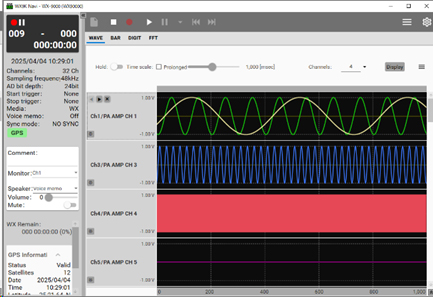
A1 : Yes. WX9K Navi is navigation software for the WX-9000 that allows you to configure all operating parameters.
It is available for download from the WX-9000 page.
https://datarecorder.jp/products/wx-9000/download.html
Q2 : Is the WX9K Navi compatible with both 32bit OS and 64bit OS ?
A2 : 64bit OS.
Q3 : Which Windows OS can the WX9K Navi be used with ?
A3 : Windows10(64bit),11.
Q4 : What is the minimum PC spec for the WX9K Navi ?
A4 : CPU: Intel® Core™ i5 3.0GHz 4Core or more
Recording Media
Q1 : What types of media are supported ?
A1 : 2.5-inch SATA SSDs with storage capacities ranging from 1TB to 4TB.
*This applies only when using media that has been verified to work.
Q2 : What are the supported operating systems and verified media ?
A2 : Please refer to the list of supported operating systems and verified media.
Q3 : Can I delete data recorded on the SSD on a per-file basis ?
A3 : You cannot delete files individually.
This is to prevent fragmentation, which can occur when deleting files individually and lead to a decrease in recording speed.
Please copy any necessary files before formatting.
Q4 : What is the total number of recorded data entries ?
A4 : Please aim to keep the total number of recorded data entries at 1,000 or fewer (maximum 999).
Please check that there is sufficient free space on the recording media before recording.
Q5 : Are there any precautions to take when setting the recording destination to a PC?
A5 : To ensure stable data recording, we recommend recording to the PC’s internal storage (internal HDD/SSD).
If you use external storage such as a USB flash drive or external HDD, continuous writing operations may not function properly due to factors such as connection stability, data transfer speeds, and power supply. Therefore, for long-term or continuous data recording, please consider using internal storage.
Data protection
Q1 : What happens in the case of a short power interruption ?
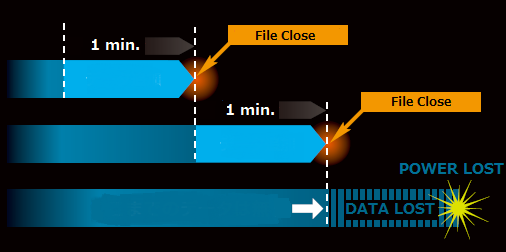
A1 : The WX-7000 has a data protection feature to prevent data loss due to unexpected power failure. Files are closed and saved every 60sec.
Periodic File Closure
WX-9000 closes data files every 60 seconds while recording.
Therefore, even if an unexpected power failure occurs during recording, most of recorded data is saved.
The maximum data loss possible is the last 60sec.